
Every coach in your club in one system
From a few coaches to several dozen, each with their own group or clients. A shared exercise library, a calendar and your club colours on the athletes’ phones.
- From a few coaches to several dozen
- Groups: age, squad, positions
- You decide who sees what
Two examples
The same PlanTau, set up two ways: a youth academy with groups, and a gym where every trainer has their own clients.
Bar – share of planned sessions done this week
What the club gets
Coaches
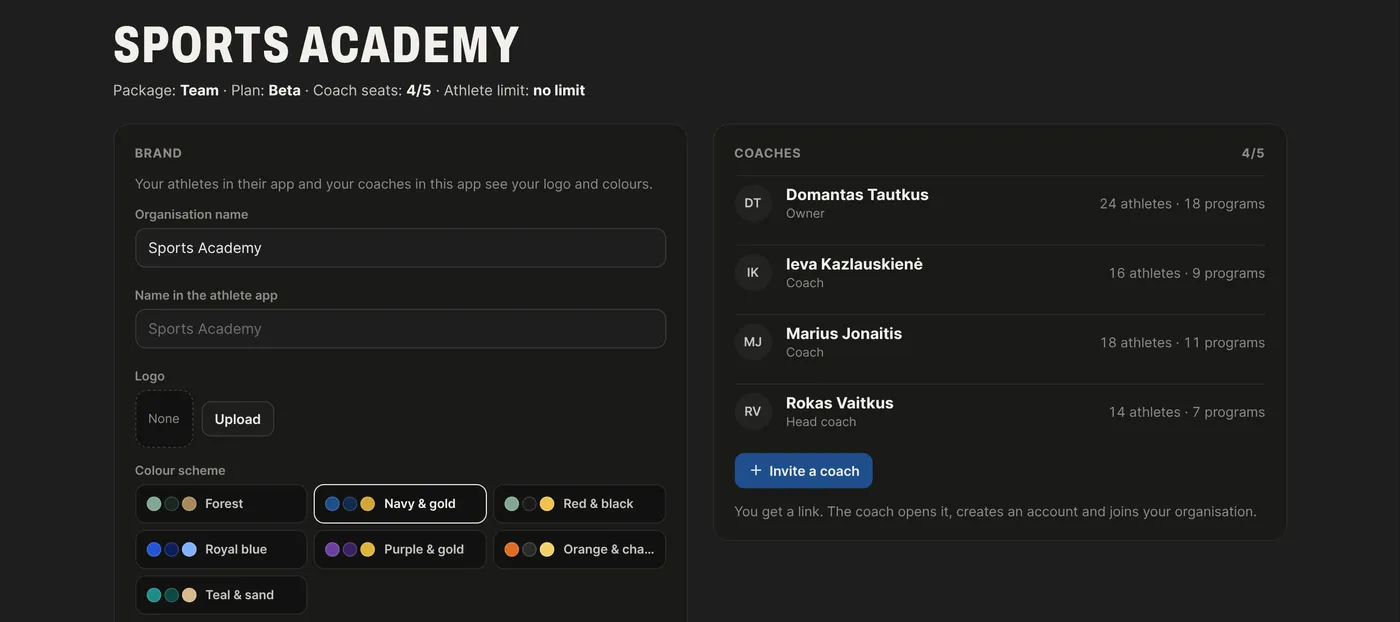
Invite coaches with a link – they start working in your club straight away. Set the club logo and colours once for everyone.
- As many coaches as you need, even dozens
- Each coach with their own groups or clients
- Club logo and colours for everyone
Who sees what
You set the rights. The manager sees everything, the head coach every group, a coach only their own groups or clients, and an athlete only their own sessions.
- Colour-coded groups
- Coaches assigned to groups
- Calendar filtered by group
| All groups | Own groups / clients | Coach activity | Club settings | |
|---|---|---|---|---|
| Club owner / manager | ✓ | ✓ | ✓ | ✓ |
| Head coach | ✓ | ✓ | ✓ | – |
| Coach | – | ✓ | – | – |
| Athlete / client | – | own sessions only | – | – |
See how your coaches work
For every coach – number of athletes, planned and completed sessions, what is still not written. Works for an academy and a gym alike. You see numbers, not clients’ personal data.
- This week and last
- “Worth a look” – where something is stuck
- No need to call your coaches
| Coach | Athletes | Planned | Done | Not written |
|---|---|---|---|---|
| Tomas | 14 | 38 | 92% | 0 |
| Eglė | 12 | 31 | 88% | 1 |
| Mantas | 11 | 27 | 75% | 2 |
| Paulius | 9 | 14 | 64% | 4 |
Worth a look: Paulius has 4 clients with nothing planned for next week.
Exercises: shared and your own
The club has a shared exercise library with categories and videos. Every coach can add an exercise just for themselves or to the club library. Your own exercises can be exported and imported.
- Same names – progress doesn’t get mixed up
- An exercise “just for me” or “for the club”
- Export and import from a file
Programs: for you or for the club
A coach saves a session or program just for themselves or to the shared club library. The club library is sorted by group, and a new coach starts from the club’s templates.
- Personal programs stay personal
- Folders by group
- Multi-week programs
Your club on the athlete’s phone
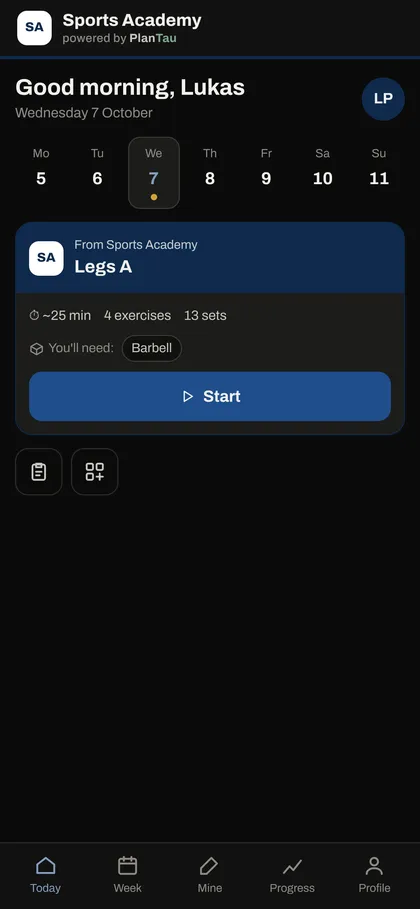
Athletes see your club’s name and colours. They do the session on their phone and results go back to their coach.
- Nothing to download
- A join code in one tap
- RPE and wellbeing after the session
AI helps every coach.
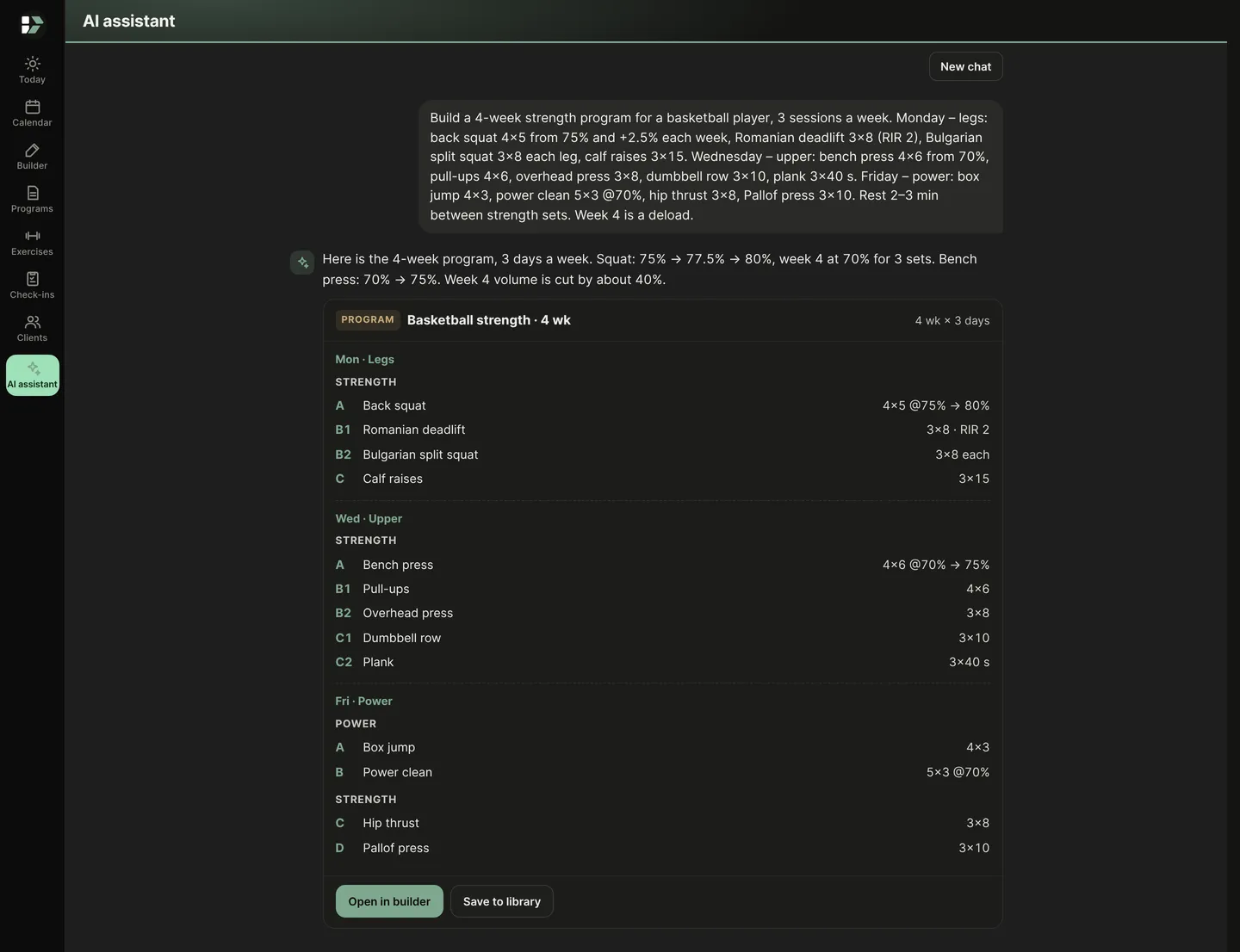
Every coach in the club gets the AI assistant: a program from one sentence, dictation, exercise cues – all from the club’s exercise library.
- A program from your descriptionE.g. “A 4-week strength program for a basketball player, 3 sessions a week: Monday back squat 4x5 from 75%, +2.5% each week, Romanian deadlift 3x8 RIR 2, Bulgarian split squat 3x8… Wednesday bench press 4x6 from 70%, pull-ups 4x6… Friday box jumps, power cleans 5x3 @70%. Week 4 is a deload.” You get the program with days, sets and load.
- Dictate instead of typingSay the exercises out loud – they appear in the text and turn into a session.
- Exercise cues in a secondFrom an exercise name – technique cues, muscles and a default plan.
- You always have the last wordOpen it in the builder, change it your way, and only then assign it.
AI can make mistakes – review the plan before you assign it.
Coach, Teams or Performance?
| Coach | Teams | Performance | |
|---|---|---|---|
| Who it’s for | One coach and their clients | A gym, team or academy with several coaches | Sports teams that track load |
| Programs, calendar, player app | ✓ | ✓ | ✓ |
| Your logo | ✓ | ✓ | ✓ |
| Club colours in the app | – | ✓ | ✓ |
| Several coaches | – | ✓ | ✓ |
| Groups and who sees what | – | ✓ | ✓ |
| Trainer activity overview | – | ✓ | ✓ |
| Load, ACWR, readiness | – | – | ✓ |
| GPS and force-plate import | – | – | ✓ |
| Return to play (RTP) | – | – | ✓ |
| Team events calendar: games, travel, practices | – | – | ✓ |
| Testing: jumps, sprints, maxes | – | – | ✓ |
| Injuries, pain and wellbeing | – | – | ✓ |
| Reports and AI analysis | – | – | ✓ |
| Price | per coach | by number of coaches | by agreement |
Write to us.
Tell us how many groups and coaches you have – we’ll set up the club, add the coaches and put in your colours.
Need load, readiness and testing too? See PlanTau Performance
PlanTau Teams
For gyms, teams and academies with several coaches.
- As many coaches as you need
- Trainer activity overview
- Groups and who sees what
- Shared and personal exercise and program libraries
- Club logo and colours
- Help moving your data in
Priced by the number of coaches
Get in touchQuestions
How do coaches join?
The club owner creates an invite link. The coach opens it, creates an account and joins the club.
How many coaches can a club have?
As many as you need – from a few to several dozen. The price depends on the number of coaches.
Can a coach use their own exercises?
Yes. Everyone gets the club’s default exercise library, and each coach can add their own exercises next to it.
Will a youth coach see the first team?
Only if you allow it. For each coach you set “Sees everything” or “Only their groups”.
Can a coach also keep private clients?
Yes. A coach can have a separate space of their own – it doesn’t mix with the club’s data.
How do players join?
Each player gets a code. They open PlanTau on their phone and see their sessions in your club colours.
Will the gym see my clients’ data?
In the trainer overview the gym manager sees only numbers – clients, sessions, completion. You decide who sees what.
What happens when a coach leaves?
Their programs and the players’ history stay with the club. You hand the players to another coach.